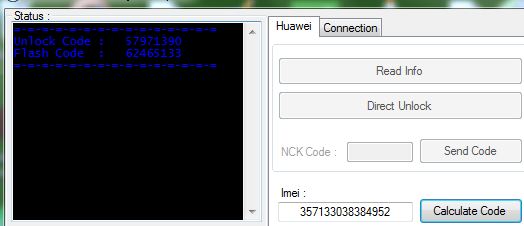
It is no more News that you can unlock your 3G Faslink Modem, Unlock Glo
Modem, Unlock Zain Modem, Unlock Etisalat Modem and turn them to
Universal Modems with which you can use any SIM card of any network of
your choice. This is been possible with the help of Unlocking Softwares
which require mainly the IMEI number of your Modem for them to calculate
the unlocking code for you within a click of a button.
Some smart guys have been making money for themselves offering this
unlocking service in return for cash, while some are offering the
service free of charge. I have been unlocking for some people free of
charge while some also do send me recharge vouchers just to help them do
it and text it to their phone. This way, I keep receiving a lot of
recharge vouchers, enough for me to be paying for my internet
subscription. Imagine, thats just the new way I now browse for
free.......
What To Do After Receiving The Unlock Code
Once you have your unlock code handy, insert a SIM CARD different from
the network that originally owns the modem i.e if you have MTN Fastlink
modem, remove the MTN SIM and replace it with maybe Glo, Zain or
Etisalat SIM. Thereafter, plug your modem back into your computer. After
some seconds, you should then see a small window in which you can input
the Unlock code. The picture below is what the small window normally
looks like.

Type in the unlock code correctly inside the small window and click
enter. If the unlocking is successfull, the small window will disappear
meaning that your 3G modem has been successfully unlocked
NOTE: If any small window DID NOT pop up, then it simply means
your modem is not locked. To confirm this, you should also see the name
of the new network, lets say Glo, appearing next to the network bars at
the lower left corner of the modem's dashboard.
You ONLY have 10 attempts to unlock your modem.
This simply means if you input the WRONG code 10 times, then your modem
will be locked FOREVER. Hance, don't think you can use "Try &
Error" or Permutation to get the unlock code. This is not "Further
Mathematics"...lol
The Unlocking software will always calculate the right Unlocking code
for you. So, let people that have the software unlock for you.
How To Create Profiles For MTN, Glo, Zain and Etisalat
After unlocking your modem, you will need to create new profiles for
other networks you want to connect to via the unlocked modem..
To do this, click on "
Tools" then "
Options" under which you will now select "
Profile Management".
Under
Profile Management, click on
New and fill in the following for each network you want to setup as shown in the picture below..
For MTN
Profile Name: MTN
APN: web.gprs.mtnnigeria.net
Username : web
Password : web
For Globacom
Profile Name: Glo
APN: gloflat
Username : :flat
Password : flat
For Zain
Profile Name: Zain
APN: internet.ng.zain.com
Username : internet
Password : internet
For Etisalat
Profile Name: Etisalat
APN: etisalat
Username :web (you can also leave it blank)
Password : web (you can also leave it blank)
Once you’re done creating the profile, click
Save to save the settings, then
New if you want to set up
another network.
When you’re through setting up the networks, go back to the
Connection page, select the network you want to browse with, from the drop down box, then click
connect.
If everything was setup properly without any mistake, you should be able to get connected to the Internet
unless the network is messing up at that point in time.
Note: As at the time of writing this, it has been observed that
some MTN fastlink modems do not work with GLO SIM even after unlocking.
Presently, I am using a Glo Modem and I have used ALL the networks with
it. The Glo Modem has interface for making calls, checking account
balance and for loading vouchers. More so, the Glo Modem has a special
support for Windows 7, hence, works perfectly with it.
That's all for now.
I hope this helps...
Go here to unlock your Modem
Feel Free to share this blog post with your friends using the share buttons below this post.
If you have anything to say or ask, Kindly make use of the comment form below.
Cheers!

 Sharing your computer’s internet access among your Wi-Fi devices is
an easy way to save bandwidth and maintain network security. In this
post, I have put up a collection of the best Wi-Fi software that can
share a single internet connection among your friends,devices and other
Wi-Fi enables products.
Sharing your computer’s internet access among your Wi-Fi devices is
an easy way to save bandwidth and maintain network security. In this
post, I have put up a collection of the best Wi-Fi software that can
share a single internet connection among your friends,devices and other
Wi-Fi enables products.